Order Lines
Introduction
The Order Lines section provides a detailed view of all items associated with a selected order. It enables users to review product-level information, track order line status, and access key attributes such as item details, quantity, and region. This section supports efficient monitoring and validation of order fulfillment activities.
Order Lines – UI Reference Table
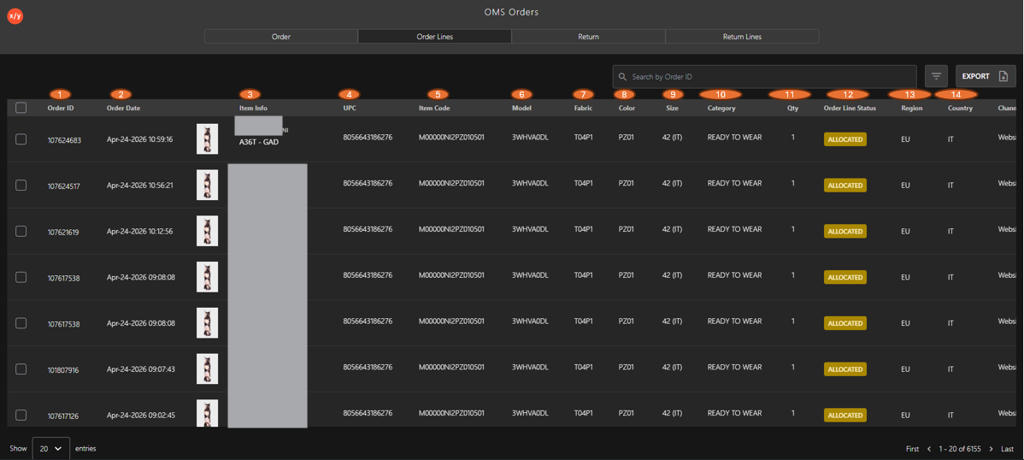
The following table describes the features that support common follow-up tasks.
| Callout ID | Feature | Description |
|---|---|---|
| 1 | Order ID | Displays the unique identifier of the order. |
| 2 | Order Date | Displays the order's creation date and time. |
| 3 | Item Info | Displays the product image along with brand and item details. |
| 4 | UPC | Displays the item's Universal Product Code. |
| 5 | Item Code | Displays the internal SKU or item code. |
| 6 | Model | Displays the product model. |
| 7 | Fabric | Displays the material or fabric type. |
| 8 | Color | Displays the item color. |
| 9 | Size | Displays the item size. |
| 10 | Category | Displays the product category. |
| 11 | Qty | Displays the quantity ordered. |
| 12 | Order Line Status | Displays the item's current status (for example, Allocated). |
| 13 | Region | Displays the region associated with the order. |
| 14 | Country | Displays the order's country. |
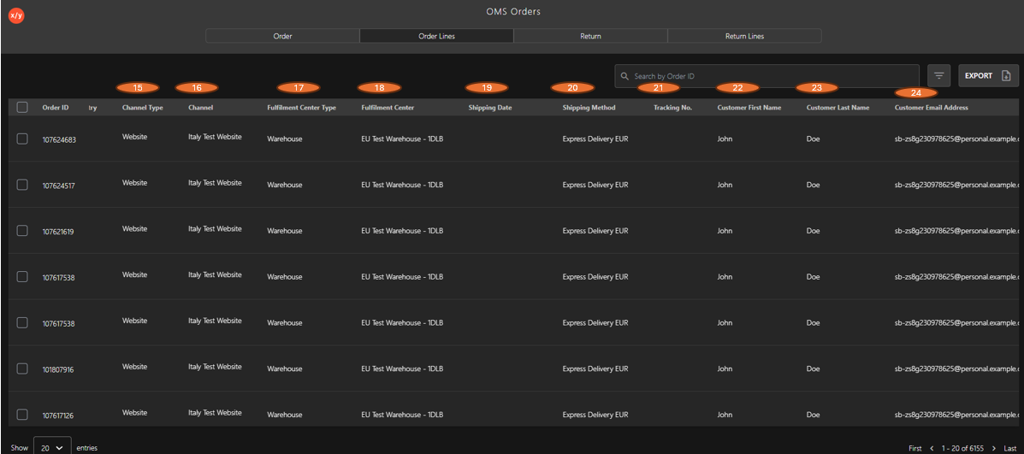
The following table describes the features that support common follow-up tasks.
| Callout ID | Feature | Description |
|---|---|---|
| 15 | Channel Type | Displays the type of sales channel through which the order was placed (for example, Website). |
| 16 | Channel | Displays the specific sales channel or platform used to place the order. |
| 17 | Fulfillment Center Type | Displays the type of fulfillment location handling the order (for example, Warehouse). |
| 18 | Fulfillment Center | Displays the name of the fulfillment center responsible for processing the order. |
| 19 | Shipping Date | Displays the date scheduled for shipping the order. |
| 20 | Shipping Method | Displays the delivery method selected for the shipment. |
| 21 | Tracking No. | Displays the shipment's tracking number for delivery monitoring. |
| 22 | Customer First Name | Displays the customer's first name linked to the order |
| 23 | Customer Last Name | Displays the customer's last name linked to the order. |
| 24 | Customer Email Address | Displays the customer’s email address |
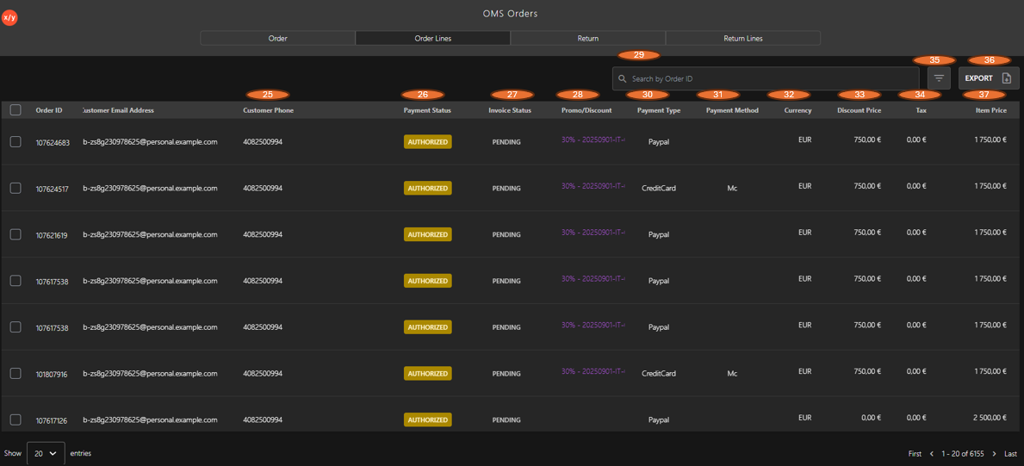
The following table describes the features that support common follow-up tasks.
| Callout ID | Feature | Description |
|---|---|---|
| 25 | Customer Phone | Displays the contact number of the customer associated with the order. |
| 26 | Payment Status | Displays the order's current payment status (for example, Authorized). |
| 27 | Invoice Status | Displays the invoice generation status for the order (for example, Pending). |
| 28 | Promo/Discount | Displays the applied promotion or discount details for the order. |
| 29 | Search | Allows users to search order lines using the Order ID. |
| 30 | Payment Type | Indicates the payment type (for example, PayPal, Credit Card). |
| 31 | Payment Method | Displays the specific payment method or provider used for the transaction. |
| 32 | Currency | Displays the currency used for the transaction. |
| 33 | Discount Price | Displays the discount amount applied to the order. |
| 34 | Tax | Displays the tax amount applied to the order. |
| 35 | Filter | Allows users to apply filters to refine the displayed order lines. |
| 36 | Export | Enables exporting the order line data. |
| 37 | Item Price | Displays the final price of the item after applying discounts and taxes. |